Unit 4 · Big Idea 5 · Capstone
The Long Run
Student Lab · Reliability Across a Whole Mission
Student PIN:
Overview
Every lab so far taught you that the real world is imperfect — motors , turns drift, batteries fade, models are never exact. A short move can hide those errors. But a long run with many steps? The tiny errors pile up until the robot is completely lost. Today’s capstone is the reliability answer: a long, multi-part mission where the robot constantly re-checks reality and wipes out its accumulated error along the way. You’ll touch Botguy and return both cones to the starting box — and stay accurate the whole time by squaring up again and again.
The Big Idea of This Unit
You cannot stop errors from happening. But you can keep resetting them. A reliable robot doesn’t trust its own dead reckoning across a long run — it keeps re-referencing known features (walls, lines) to zero out drift before it grows dangerous.
By the end of this activity you will be able to:
- Plan a long, multi-objective run that avoids obstacles.
- Use square-ups as deliberate error-reset checkpoints.
- Combine your whole library into one reliable competition run.
- Explain how re-referencing known features keeps a long run accurate.
Phase 1 — The Mission & Its Rules
The run
Start in the right starting box. In one continuous run: touch Botguy, then move both cones back into the starting box, and finish.
The rules that make it hard
- Verify your start: begin with a backward touch (
back_until_pressed) against the wall — this confirms you’re really in the starting box and resets your origin before you move. - Avoid the large cube: there’s a large cube on the right next to the starting box. Your path must not touch it. Plan around it.
- Stay accurate: your run must include at least 6 square-ups, placed as error-reset checkpoints throughout.
Say the mission back in your own words, including the three rules. Why does starting with a backward touch make the whole rest of the run more trustworthy?
Phase 2 — Concept: The Square-Up Is an Error Reset
Think back to the 8-turn drift test: one turn looked fine, but eight turns stacked a tiny error into a big one. The same thing happens across a long run — every drive and turn adds a little error, and it never goes away on its own. It just grows.
A square-up fixes this. When the robot squares up against a line, it forces itself into a known, exact position and heading — no matter how crooked it had drifted. All the accumulated error is wiped back to zero. The robot gets a fresh, trustworthy starting point for the next leg.
Error Reset Checkpoint
Every time you call square_up() (or back_until_pressed()), think of it as a checkpoint that says: “I don’t care how much I drifted — I now know exactly where I am again.” That’s why this run needs at least six of them.
In your own words, why does error “accumulate” over a long run? How does a square-up reset it?
Phase 3 — Plan: Map the Path
Draw your whole run. Mark the right starting box (drawn for you), Botguy, both cones, and the large cube you must avoid. Sketch the path: out to Botguy, over to the cones, and back to the box — routed clear of the large cube.
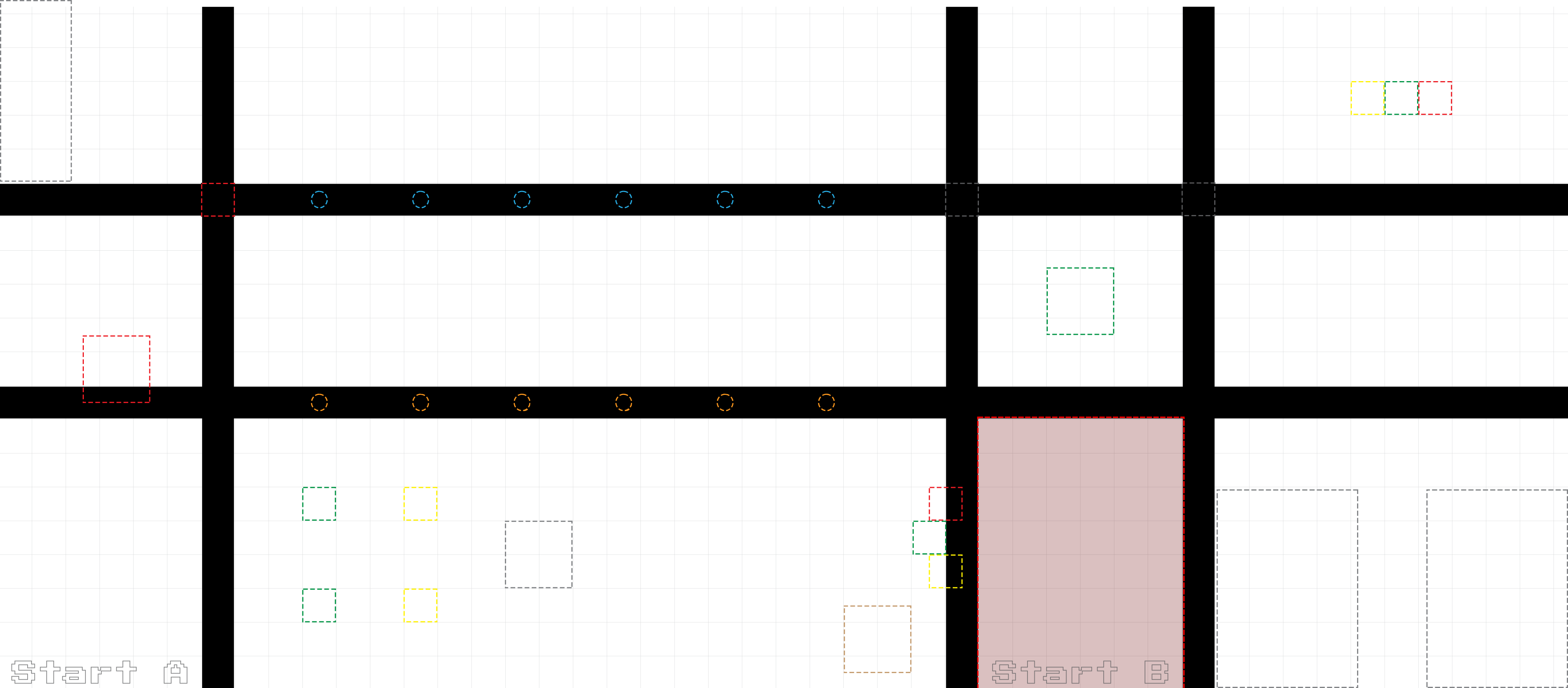 Sketch: Botguy, both cones, the large cube to avoid, and your path
Draw on the printed copy, or describe your planned path below.
Phase 4 — Plan: Place Your 6+ Error Resets
Now walk your path and decide where each square-up goes. Good reset points are right before something precise ( Botguy, grabbing a cone, entering the box) — so you’re accurate exactly when it matters. List each leg of the run and mark where you reset.
| # | Leg of the run (what the robot does) | Library call(s) | Reset here? |
|---|---|---|---|
| 1 | |||
| 2 | |||
| 3 | |||
| 4 | |||
| 5 | |||
| 6 | |||
| 7 | |||
| 8 |
How many square-ups did you plan, and where did you put them? Why did you choose those spots instead of others?
Phase 5 — Build: The Run in main()
Write your run in main(), translating your plan into library calls. Start with the backward touch, then follow your path — and put a square_up() at each reset checkpoint you planned. Scoring is optional here; you can milestones if you like, but the real goal is a reliable, accurate run.
// Unit 4, Big Idea 5: The Long Run
// Name: _______________________   Date: ___________

#include <kipr/wombat.h>

#include <yourname.h>     // your full library

int main()
{
	enable_servo(0);
	enable_servo(3);

	// ===== VERIFY START =====
	back_until_pressed();       // backward touch: confirm we're in the box, reset origin
	square_up();                // RESET #1: known heading before we move

	// ===== LEG 1: to Botguy (avoid the large cube!) =====
	// Drive(...) / Turn(...) around the large cube to Botguy
	square_up();                // RESET #2: square up before the precise touch
	// ...touch Botguy...

	// ===== LEG 2: to the first cone =====
	// Drive(...) / Turn(...) to cone 1
	square_up();                // RESET #3
	// ...collect / push cone 1...

	// ===== LEG 3: to the second cone =====
	// Drive(...) / Turn(...) to cone 2
	square_up();                // RESET #4
	// ...collect / push cone 2...

	// ===== LEG 4: back to the starting box =====
	// Drive(...) / Turn(...) toward the box
	square_up();                // RESET #5
	// ...bring the cones into the box...
	square_up();                // RESET #6: final alignment in the box

	return 0;
}check
At least 6 square-ups, a backward touch to start, a path that avoids the large cube, and it must touch Botguy and return both cones. The skeleton shows six reset points — fill the driving/turning/collecting from your Phase 3–4 plan.
Phase 6 — Run It, Then Test Its Reliability
Get it working one leg at a time. Then do the real reliability test: run the whole thing several times from the same start, and see how consistent it is. A reliable run succeeds the same way every time.
Reliability = repeatability
A run that works once might be luck. A run that works 4 times out of 4 is reliable. Your square-up resets are what turn a lucky run into a repeatable one.
| Run | Touched Botguy? | Both cones in the box? | Where it drifted / what you fixed |
|---|---|---|---|
| 1 | |||
| 2 | |||
| 3 | |||
| 4 |
How many of your runs fully succeeded? If a run failed, was it because a square-up was missing where you needed one? Where would adding a reset help?
Phase 7 — Connect & Reflect
AI Literacy Thread
Reliable systems constantly re-check reality and reset their accumulated error.
Your robot succeeded across a long run not by being perfect, but by never trusting its own drift for too long. Every square-up pulled it back to a known truth. This is one of the deepest ideas in reliable autonomy. A spacecraft re-checks its position against the stars. A self-driving car re-locates itself against lane lines and landmarks constantly. A surveyor re-references known benchmarks. None of them assume their internal estimate is still correct — they keep measuring reality and correcting. You just built that same discipline into a robot: act, but keep re-checking the world and resetting your error before it grows.
Complete the reflection on your own.
1. Why does error accumulate over a long run, and why can’t you just “drive more carefully” to avoid it?
2. How does a square-up reset accumulated error? Why did this run need at least six of them?
3. Why is a run that succeeds 4 out of 4 times better than one that scores higher but only works sometimes?
4. Complete in 2–3 sentences: “Reliable systems constantly re-check reality and reset their error. This means that over a long mission, a robot should…”
Extension Challenges
Finished early? Try one or more of these.
Extension A — Remove a Reset
- Delete one of your square-ups and run it several times. Does the run get less reliable? Which reset mattered most?
Extension B — Score It
- Add score tracking with
printflike the red-cube run. Touching Botguy and returning cones are worth real points — report your total.
Extension C — Handle a Failure
- What if the robot misses a cone? Sketch a recovery: how could it back up, re-square, and try again instead of continuing blindly?
Extension D — Fewer, Smarter Resets
- Could you succeed with only 4 well-placed resets instead of 6? Where would the most valuable resets be, and why?
Extension E — Splitting the Work
- If you’d built today’s Long Run with a partner instead of solo, how would you split the work into roles — for example, one person tunes
Drive/Turnconstants while the other plans the reset sequence? - What collaborative tool (a shared doc, GitHub, a group chat) would help you combine your work without overwriting each other’s changes?
Extension F — Build a Status Screen
- The graphics library lets you open a real drawing window and put shapes and text on it. Try building a simple run-status screen:
msleep(1000);
graphics_open(320, 240);
graphics_clear();

// progress bar frame + filled portion (vector graphics: rectangles)
graphics_rectangle(10, 10, 210, 30, 255, 255, 255);
graphics_rectangle_fill(10, 10, 110, 30, 0, 200, 0);  // ~50% filled

// pass/fail indicator (vector graphics: circle)
graphics_circle_fill(260, 20, 12, 0, 200, 0);

// a label (text)
graphics_print_string("RUN STATUS", 10, 50, 255, 255, 255, 1.0);

graphics_update();   // nothing appears on screen until you call this
msleep(5000);- Use
graphics_line()to plot 2-3 points of a reading over time as connected line segments — a simple live trend graph. - Update your progress bar’s filled width as your mission runs (recall
graphics_rectangle_fillfrom above), instead of drawing it once at a fixed size. What would you need to know to calculate how “full” the bar should be at any moment? graphics_blit_enc()can display a real bitmap image — a small of pixel color values — instead of shapes. What’s the difference between drawing a rectangle withgraphics_rectangle_fill(a formula the computer calculates) and displaying a bitmap withgraphics_blit_enc(stored pixel-by-pixel data)?get_key_state()andget_mouse_position()read live keyboard/mouse input from the same graphics window. Add a check so your status screen only advances to the next step when a specific key is pressed — a simple interactive interface, not just a fixed display.
Download saves a local copy of your answers. It does not turn in your work automatically; give the downloaded file to your teacher.
KIPR · Botball Explorer · Unit 4 Big Idea 5 — Capstone Lab