Student Lab · Measuring, Storing, and Making Sense of Performance
Student PIN:
Unit Guiding Question
How can a machine operate reliably in an imperfect world?
Big Idea
Performance Can Be Measured
AI Literacy Thread
A system that never measures its own performance can’t tell whether a change actually helped.
CS1 Concepts
systime() & Elapsed Time · · for Metrics · Flags · Linear Search · Sorting · Efficiency
Game Context
Mission 12 + Mission 16 — recover 2 spilled cubes, stack them on the Large Green Cube
What You Need
Explorer robot · full · 2 spilled cubes · Large Green Cube · the game field · this lab sheet
Before you start: type your PIN in the box at the top of the page. Your teacher gave you this number. When you finish, press Download to save a local copy of your answers. This does not turn in your work automatically; give the downloaded file to your teacher.
Overview
Every lab so far has asked “did it work?” Today’s question is different: “did it get better?” You can’t answer that without a number. Today you’ll time a real mission run, store repeated timing results the same way you stored pose data in Big Idea 1, and then write code that actually studies that stored data — finding the best and worst runs, and putting them in order.
The Big Idea of This Unit
A system that never measures its own performance can’t tell whether a change actually helped. Feeling faster isn’t the same as being faster — you need a number, and you need to keep it.
By the end of this activity you will be able to:
Use systime() to measure how long a routine actually took.
Use the modulo operator (%) to turn a raw time value into something readable.
Store repeated measurements in an array, and use a boolean to track a running yes/no answer inside a loop.
Write a linear search to find the best and worst value in a .
Write a simple sort, and reason about how its cost changes as the data set grows.
Phase 1 — The Mission: Restack & Shelve
The run
Pick up 2 spilled cubes and stack one the other, placed on top of the Large Green Cube.
This single stacking action scores three things at once: Mission 12’s Base Mission (two spilled cubes forming a valid stack), and Mission 16’s Base and Bonus Mission (one, then a second, spilled cube ON TOP OF the Large Green Cube) — confirmed directly by the rules’ own scoring examples. One clean action, most of the points on the board for these two missions.
Two spilled cubes form a scoring stack — one spilled cube is another spilled cube. Both cubes must originate from the spilled cube area. Edge-to-face or corner-to-face contact does not satisfy this definition for Mission 12.
Two or more cubes originating from the Spilled Cube area are the Large Green Cube.
Scores
One spilled cube is the Large Green Cube.
One spilled cube is the Large Green Cube while supported by a robot.
One spilled cube another spilled cube that is the Large Green Cube.
Multiple spilled cubes the Large Green Cube.
Does Not Score
A spilled cube touching only the side of the Large Green Cube.
A spilled cube not originating from the Spilled Cube area.
Only one spilled cube the Large Green Cube for the Bonus Mission.
Say the mission back in your own words. Why does stacking the cubes on the Large Green Cube, instead of just on each other, matter for how many points you earn?
Phase 2 — Concept: Measuring and Reading Elapsed Time
A new type: unsigned long
You’ve stored numbers in double, int, and char so far. Timing needs a new one: unsigned long.
long is an type, like int, but built to hold larger whole numbers — useful here because a running clock value climbs quickly and keeps climbing the whole time your robot is on. unsigned means the variable can never be negative; in exchange for giving up negative numbers, it can count even higher using the same amount of memory. A timer value is never negative and never needs to be — a perfect match for unsigned long.
What does systime() actually return?
systime() returns an unsigned long that keeps climbing the whole time your robot is powered on — but the documentation doesn’t spell out the exact unit, so don’t guess. Find out for yourself, the same way you found ticks_per_inch by measuring instead of assuming:
unsignedlongstart=systime();msleep(5000);// wait exactly 5 real seconds
unsignedlongstop=systime();printf("Difference: %lu\n",stop-start);
Run that. A 5-second wait should make the unit obvious from the size of the number you get back.
What number did you get, and what does that tell you about the unit systime() counts in?
The init_time / elapsed pattern
Once you know the unit, timing any routine follows the same two-line pattern: capture the time before, capture it again after, subtract.
A raw elapsed value is hard to read at a glance. % is the modulo operator — it gives you the remainder of division, not the quotient. That’s exactly the tool for splitting a total into readable parts:
unsignedlongtotal_sec=elapsed/1000;// whole seconds (adjust if your unit differs)
unsignedlongminutes=total_sec/60;unsignedlongseconds=total_sec%60;// <-- THIS % is the modulo operator (math), not the %lu below (text formatting)
printf("Elapsed: %lu:%02lu\n",minutes,seconds);
% is new — you’ve used / plenty, but division only gives you how many whole groups fit. Modulo gives you what’s left over after those whole groups are removed.
Careful: you’re about to see two completely different jobs for the % symbol in the same few lines. In total_sec % 60, it’s math — the modulo operator, computing a remainder. In "%lu" inside a , it’s not math at all — it’s a placeholder telling printf “put a number here.” Same symbol, two unrelated meanings, depending on whether it’s sitting inside quotes or out in your code doing arithmetic.
If total_sec is 197, what do 197 / 60 and 197 % 60 each give you, and what do those two numbers mean together?
Phase 3 — Build: Time the Restack Run
Wrap your Restack & Shelve routine in the timing pattern from Phase 2, using your own library calls.
main.c
intmain(){enable_servo(0);enable_servo(3);unsignedlonginit_time=systime();// ===== the mission itself, using your own library =====
// Drive(...) / Turn(...) to spilled cube 1, pick it up// Drive(...) / Turn(...) to the Large Green Cube, place it// Drive(...) / Turn(...) to spilled cube 2, pick it up// Drive(...) / Turn(...) back to the Large Green Cube, stack itunsignedlongelapsed=systime()-init_time;unsignedlongtotal_sec=elapsed/1000;// use what Phase 2 taught you about the unit
printf("Elapsed: %lu:%02lu\n",total_sec/60,total_sec%60);return0;}
Why does init_time get captured before the mission code runs, and elapsed get calculated after it finishes — what would go wrong if you calculated elapsed too early?
Phase 4 — Run It 4 Times
Reset the 2 spilled cubes to their starting positions between attempts, and run the full mission 4 separate times. Record each printed elapsed time (in seconds — convert from the MM:SS your program prints).
Record your 4 trial times
Trial
Printed MM:SS
Elapsed in seconds
1
2
3
4
Phase 5 — Concept: Studying Your Own Data
An array of results, not just one
Back in Big Idea 1, pose[3] grouped three related values under one name. Today’s array groups four results from the same measurement, repeated:
doubletimes[4]={t1,t2,t3,t4};// your 4 recorded seconds from Phase 4
: walking through an array by number
A for loop has three parts, always in the same order, separated by :
for(inti=0;i<4;i++){// this block runs once for i=0, once for i=1, once for i=2, once for i=3
}
int i = 0 — runs once, right at the start: create a counter and set where it begins.
i < 4 — checked before every trip through the loop: keep going as long as this is true.
i++ — runs at the end of every trip: add 1 to the counter.
The new part today isn’t the loop itself — it’s what you do with i inside it. Since array slots are numbered, i can walk straight into your array as an : times[i] means “whichever slot i currently points to.” As i counts 0, 1, 2, 3, times[i] visits every slot in the array in order.
Linear search: finding the best and worst
A search uses that same walk to check each value against the best one found so far:
This checks every element exactly once — that’s why it’s called linear: the work grows in a straight line with the size of the array.
Swapping two values
Sorting means trading two values’ positions. That takes three lines, not two — if you just wrote times[i] = times[i+1]; then times[i+1] = times[i];, the first line would already overwrite times[i]’s original value before you had a chance to move it into times[i+1]. You need a temporary holding spot:
doubletemp=times[i];// 1. set the first value aside, so it isn't lost
times[i]=times[i+1];// 2. copy the second value into the first spot
times[i+1]=temp;// 3. copy the saved-aside value into the second spot
Sorting: the simple version
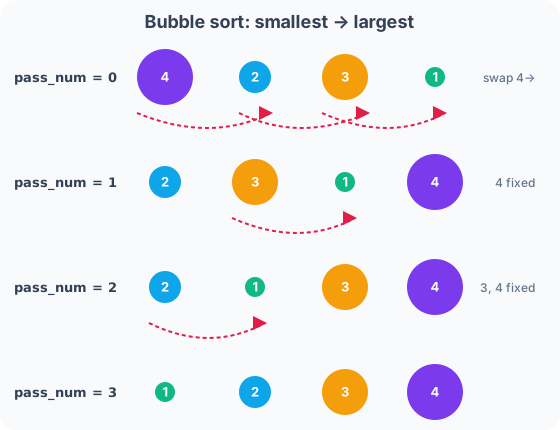
Picture 4 people standing in a line, out of height order. Walk down the line one time: compare each pair of neighbors, and swap them if the left person is taller than the right person. After one full walk, the tallest person has “bubbled” to the top like bubbles rising through water. Do that same walk a few more times, and eventually everyone’s in order. That “bubbling” to the top gives this its name: bubble sort.
for(intpass=0;pass<3;pass++)// walk down the line a few times
{for(inti=0;i<3;i++)// one full walk, comparing neighbors
{if(times[i]>times[i+1])// out of order?
{doubletemp=times[i];// swap them (see above)
times[i]=times[i+1];times[i+1]=temp;}}}
Walk through it by hand with 4 index cards showing your own 4 times, out of order. Do the swaps yourself, pass by pass, until they’re sorted. For only 4 values, 3 passes is always enough to guarantee a full sort — that’s why the outer loop stops at pass < 3.
Sorting: stopping early with a stored boolean
The version above always does all 3 passes, even if the line was already sorted after pass 1. You’ve used booleans inline before, inside an if with && or ||. Here’s a new use: store a boolean’s answer in a variable that carries a true/false memory from one pass into the next.
intswapped=1;// start true, just to make sure the loop runs at least once
while(swapped){swapped=0;// assume this pass finds nothing to fix...
for(inti=0;i<3;i++){if(times[i]>times[i+1]){doubletemp=times[i];times[i]=times[i+1];times[i+1]=temp;swapped=1;// ...unless a swap actually happened
}}}
If an entire pass finds nothing out of order, swapped never gets reset to 1, the condition goes false, and the sort stops — without wasting a pass it didn’t need.
Walk through the simple version by hand on paper first, with your own 4 numbers. Then answer: why does checking swapped let the improved version stop early on data that’s already close to sorted? What’s stored in the variable at the moment it does?
Efficiency: what happens at a bigger size?
Your search touched 4 values once each. Your sort, in the worst case, compared neighboring pairs across multiple passes over those same 4 values. Now imagine 100 recorded times instead of 4.
Would the search’s work grow by roughly 25× (matching the 25× growth in data, from 4 to 100)? Would the sort’s worst-case work grow by exactly 25×, or by something faster than that? This — how the amount of work grows as the data grows — is what computer scientists mean by algorithm efficiency.
Phase 6 — Build: Analyze Your Times
Using your 4 recorded values from Phase 4, write the full analysis: hardcode the array, search for fastest/slowest, sort it, and report all of it.
4 real trial times recorded and hardcoded into times[4]. Fastest and slowest found by search. Full array sorted using the boolean-flag loop. Both results printed.
Once your array is sorted, where do the fastest and slowest values sit in it? Could you have skipped writing a separate search entirely, if you’d sorted first?
Phase 7 — Connect & Reflect
AI Literacy Thread
A system that never measures its own performance can’t tell whether a change actually helped.
Every real engineering team does exactly what you just did: time something, run it more than once, store the results, and actually look at the numbers instead of trusting a gut feeling. A search engine times how long a query takes across millions of runs. A game studio times level-load times across every playtest. None of them trust a single run — and none of them just eyeball the numbers either; they sort them, find the extremes, and watch how those numbers change as the system scales up.
Complete the reflection on your own.
1. Walk through the init_time / elapsed pattern in your own words — what does each line actually do?
2. What does modulo (%) give you that regular division (/) doesn’t?
3. What was swapped actually tracking, and why does a stored boolean matter here in a way that an inline &&/|| check couldn’t?
4. Complete in 2–3 sentences: “A system that never measures its own performance can’t tell whether a change helped. This means that before I claim my robot got faster, I should…”
Extension Challenges
Finished early? Try one or more of these.
Extension A — Time a Different Metric
Apply the same array + search + sort pattern to a different measurement — for example, how many degrees off-target your last 4 turns landed. What changes in your code, and what stays exactly the same?
Extension B — Watch the Early Exit
Add a printf inside the while (swapped) loop that prints the value of swapped at the end of each pass. Run your sort on data that’s already close to sorted — how many passes does it actually take before swapped stays 0?
Extension C — Scaling to 8
If you had 8 trial times instead of 4, how would you need to change the array declaration and the loop bounds? In the worst case, roughly how many more comparisons would the sort need — twice as many, or more than that?
Download saves a local copy of your answers. It does not turn in your work automatically; give the downloaded file to your teacher.
KIPR · Botball Explorer · Unit 5 Big Idea 4 — Student Lab