Base Mission
3 points Live judgedAn Orange Pom satisfies the definition.
Unit 1 · Big Idea 5
Student Lab · The Pom Pusher
Student PIN:
This is the capstone of Unit 1. Your robot starts in the right starting box and must push poms off the line — Mission 4. The poms are not in a neat row, and there are other objects on the field to work around. You won’t write a brand-new command for every move. Instead, you’ll build a few small, reliable behaviors and reuse them — in different combinations — to handle a messy, real layout.
Core Insight
Big behaviors are built from small ones. A few reliable building blocks, combined in the right order, can solve a complex task — without writing anything new.
id() to see that a name is a label pointing at something, not a box holding it.You already build functions with def. Today you learn what a name actually is in Python — and why that makes def simpler than it looks.
Until now, we’ve been referring to as a labeled box with a value inside. Python doesn’t work that way. A name is more like a sticky note pointing at something that lives somewhere else. You can prove it with id(), which returns the number of wherever that “somewhere else” is in the Python you’re using on the Wombat. Use to see that number:
x = 5
print(id(x))       # This number identifies where the value 5 lives.

y = x               # y is a SECOND sticky note, pointing at the SAME place
print(id(y))        # the exact same number as id(x)
Nothing got copied into a box called y. The name y just points at the same spot x already points at.
When you write def push_off_line():, Python builds the function and then does the exact same thing it did with x = 5 — it points the name push_off_line at it. There’s no separate “promise” step to declare first; the name-to-function connection happens the moment def runs:
def push_off_line():        # the name now points at this function
    drive_forward()
    drive_forward()

print(id(push_off_line))    # This number identifies where THIS function lives.

do_it = push_off_line       # a SECOND name, pointing at the SAME function
do_it()                      # calling do_it() runs push_off_line's code
That’s why Python doesn’t need a declared above main() the way some other languages (like C) do: the name-to-function connection is made once, right where you write def, and every later use of that name just follows the same pointer.
In your own words: what does id() show you about a name? Why is “a name points at something” a more accurate picture than “a name is a box holding something”?
Think about a single dance move — say, a step-and-clap. On its own it’s tiny. But a whole routine is just that move and a few others, combined in different orders. You don’t invent a new body each time; you reuse moves you already have, arranged to fit the music.
Think it through
You know three small moves: step forward, turn, and clap. Using only those three, how many different short routines could you make?
If you wanted to add a “spin” to every routine, would you rather rewrite each routine, or build “spin” once and drop it in?
Why is it powerful to have a few small moves you can reuse, instead of memorizing every full routine from scratch?
A program is modular when it’s built from small, separate pieces — — that each do one job. Your drive_forward() and turn_right() are modules. Modular code is easier to read, easier to fix, and easier to grow, because each piece can be understood and tested on its own.
These modules come from from decomposing larger problems like you learned about in Big Idea 2.
The whole point of a module is that you write it once and reuse it many times. Today you’ll call drive_forward() and turn_right() over and over — sometimes straight from main(), sometimes from inside a bigger function. Same block, used again and again, in different places.
When you build a bigger behavior out of smaller ones, that’s composition. A function like push_off_line() doesn’t contain new motor commands — it’s composed of calls to building blocks you already trust. You stack the simple to make the complex.
Example
A music app’s “play” button is composed of smaller behaviors: find the file, read it, send sound to the speaker, update the screen. Nobody rewrites “send sound to the speaker” for every song — it’s a reusable block, called whenever it’s needed.
In your own words: what is the difference between writing one giant function that does everything, and building the same behavior out of small reusable pieces?
Mission 4
An Orange Pom satisfies the definition.
An Orange Pom and a Blue Pom simultaneously satisfy the definition.
Watch out!
The poms are scattered — not in a straight line — and there are other objects on the field you must drive around. The path from one pom to the next is different each time.
Before any code, sketch what you see. Mark the right starting box (drawn for you), the poms (use a circle for each), and any obstacles (use an X). This map is what your plan is built on.
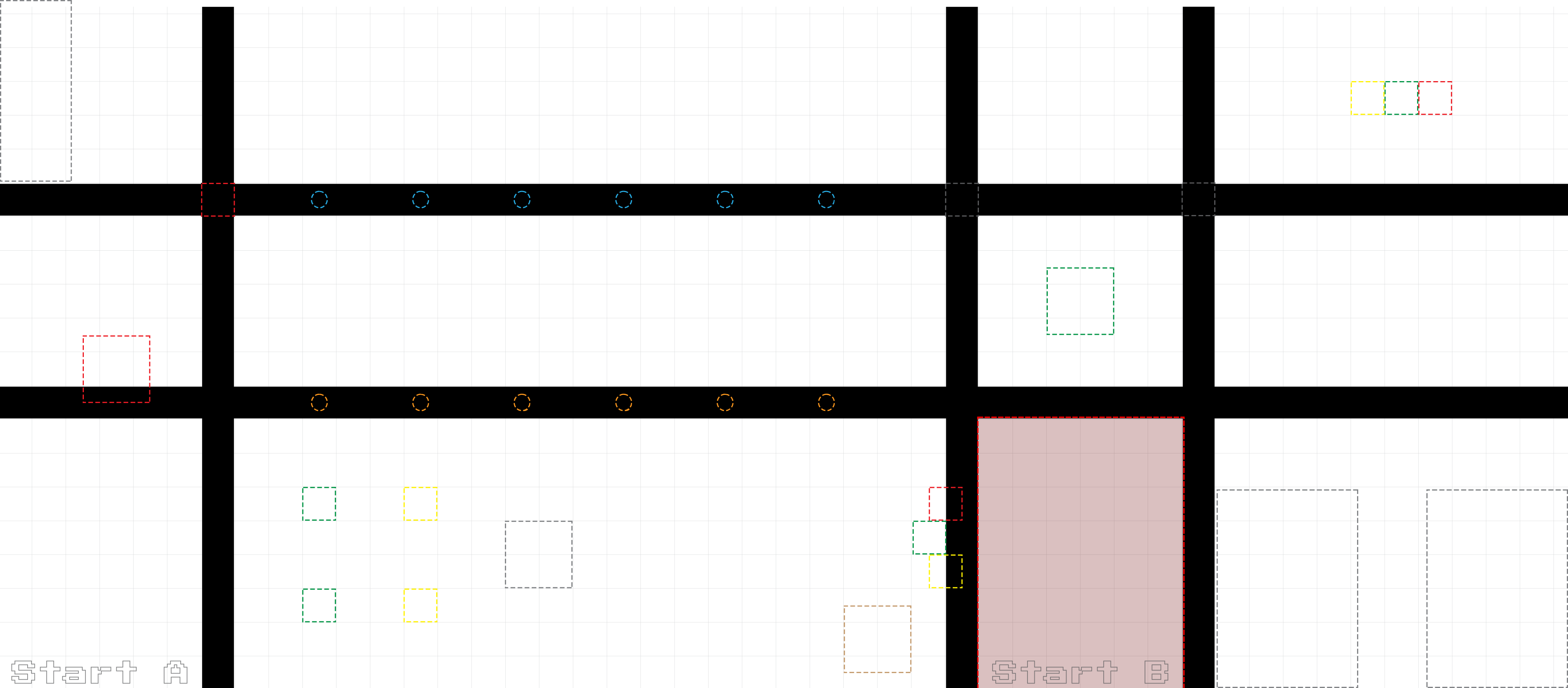 Sketch your field here --- poms = ◯, obstacles = ✕
Draw on a printed copy, or describe the layout in the box below.
For each pom, plan which building blocks get the robot there and push it off the line. Notice you’ll reuse the same blocks (drive_forward, turn_right) in a different order for each one — because each pom sits in a different place.
| Pom | Building blocks to get there & push (in order) | Obstacle to avoid? |
|---|---|---|
| 1 (orange) | ||
| 2 | ||
| 3 |
List the small functions you will build and reuse, and the one bigger behavior you’ll compose from them.
| Function name | What it does | Built from? |
|---|---|---|
| drive_forward() | Drive straight for a set time, then stop | motor, msleep, ao |
This is an example, not a copy-me template
The program below shows the pattern: a readable main() at the top calling functions that are defined below it, with building blocks reused in different combinations. Your poms are in different places than this example, so your main() will have a different order of moves. Use this to learn the shape — then write your own from your Phase 3 plan.
#!/usr/bin/python3

# Unit 1, Big Idea 5: Pom Pusher (EXAMPLE; yours will differ)

# Name: _______________________   Date: ___________

import os, sys
sys.path.append("/usr/lib")
import _kipr as k

DRIVE_SPEED = 50

# MAIN: This is your plan. The poms are NOT in a line, so the path

#    between them is different every time. You decide how to reuse

#    your building blocks to get from one pom to the next.
def main():

    push_off_line()    # first pom

    turn_right()       # The next pom is not straight ahead.
    drive_forward()    # reuse the building blocks to reach it
    push_off_line()    # second pom

    drive_forward()    # a different path again to the third
    push_off_line()    # third pom

# DEFINITIONS: Each name below points at the recipe it runs.
def drive_forward():
    k.motor(0, DRIVE_SPEED)
    k.motor(3, DRIVE_SPEED)
    k.msleep(1000)
    k.ao()

def turn_right():
    k.motor(0, DRIVE_SPEED)
    k.motor(3, -DRIVE_SPEED)
    k.msleep(600)
    k.ao()

# push_off_line is a BIGGER behavior built from SMALLER ones:
def push_off_line():
    drive_forward()    # drive into the pom, pushing it off the line
    drive_forward()    # keep going to clear it fully

main()After you write your own program, count how many times you used each building block. Reuse is the whole point — high numbers are good here.
| Building block | Times called in main() | Times called inside other functions |
|---|---|---|
| drive_forward() | ||
| turn_right() | ||
def before the point where it gets calledmain() reads like a plan — mostly function calls, not raw motor commandsmain() matches the path you mapped in Phase 3 (it is not a copy of the example)When you reuse one building block everywhere, a single weak block causes failures all over the run. The flip side: fix that one block, and every place that uses it improves at once. That is the power — and the risk — of reuse.
Common reuse bugs
One block is slightly off: if drive_forward() goes a little too far, every pom is reached a little too far. Fix the block, not each call.
Called before it’s defined: if main() tries to call a function whose def comes later in the file, Python stops with NameError: name 'push_off_line' is not defined — the name doesn’t point at anything yet. Check that every def comes before the point where it’s actually run.
Right blocks, wrong order: the robot does real moves but ends up in the wrong place. Re-check the order in main() against your map.
| Try | What went wrong | Was it the block, or the order? | How you fixed it |
|---|---|---|---|
| 1 | |||
| 2 | |||
| 3 | |||
| 4 |
Did fixing one building block fix problems in more than one place? Describe what happened.
Big Idea 5 --- AI Literacy Thread
Intelligent systems combine simple behaviors to accomplish complex goals.
Your pom-pushing run looked complex, but it was built from a few simple behaviors reused in different orders. Every large intelligent system works this way: a self-driving car combines “stay in lane,” “keep distance,” and “obey signals” into a full trip; a warehouse robot combines “navigate,” “grab,” and “place” into an entire shift. No one writes a single giant behavior for “drive across the country.” They compose it from small, tested parts.
Read each scenario. Think it through, then write your answer.
Name a complex task a robot or app does, and break it into at least three smaller behaviors it is probably built from.
You reused one building block many times. Why does building from small, tested parts make a big system more reliable than writing it all as one piece?
If one small behavior in a self-driving car (say, “detect a stop sign”) is slightly wrong, it affects the whole system. How is that the same lesson you saw when one of your building blocks was off?
Complete this section on your own.
1. What does id() show you about a function’s name? Why didn’t you need to declare anything before main() the way some other languages require?
2. Explain composition in your own words. Give one example of a bigger behavior you built from smaller ones today.
3. The poms were not in a line. How did reusing the same building blocks in different orders help you handle a messy layout?
4. Complete this in 2–3 sentences: “Intelligent systems combine simple behaviors to accomplish complex goals. This means that to build something complex, a programmer should…”
Finished early? Try one or more of these.
clear_left_side().main() to call your new high-level function. Does main() read more clearly now?main() and understand the plan without seeing the definitions?drive_forward() and turn_right() were saved in a separate file you could load into any mission.Download saves a local copy of your answers. It does not turn in your work automatically; give the downloaded file to your teacher.
KIPR · Botball Explorer · Unit 1 Big Idea 5 — Student Lab